Org Compare for Salesforce

Polo Same, different or missing. Between any two orgs.

A panel for Chrome, Edge, Firefox and Safari that lives next to Setup. Click a component and Polo tells you whether it's the same, different or missing in the org you're comparing against, what changed, and who changed it. Open the Org drift map and you get every difference between the two orgs at once. No OAuth, no connected apps, no new passkeys: if you're signed into the org in your browser, Polo can see it. Read-only, and your metadata never leaves your browser.
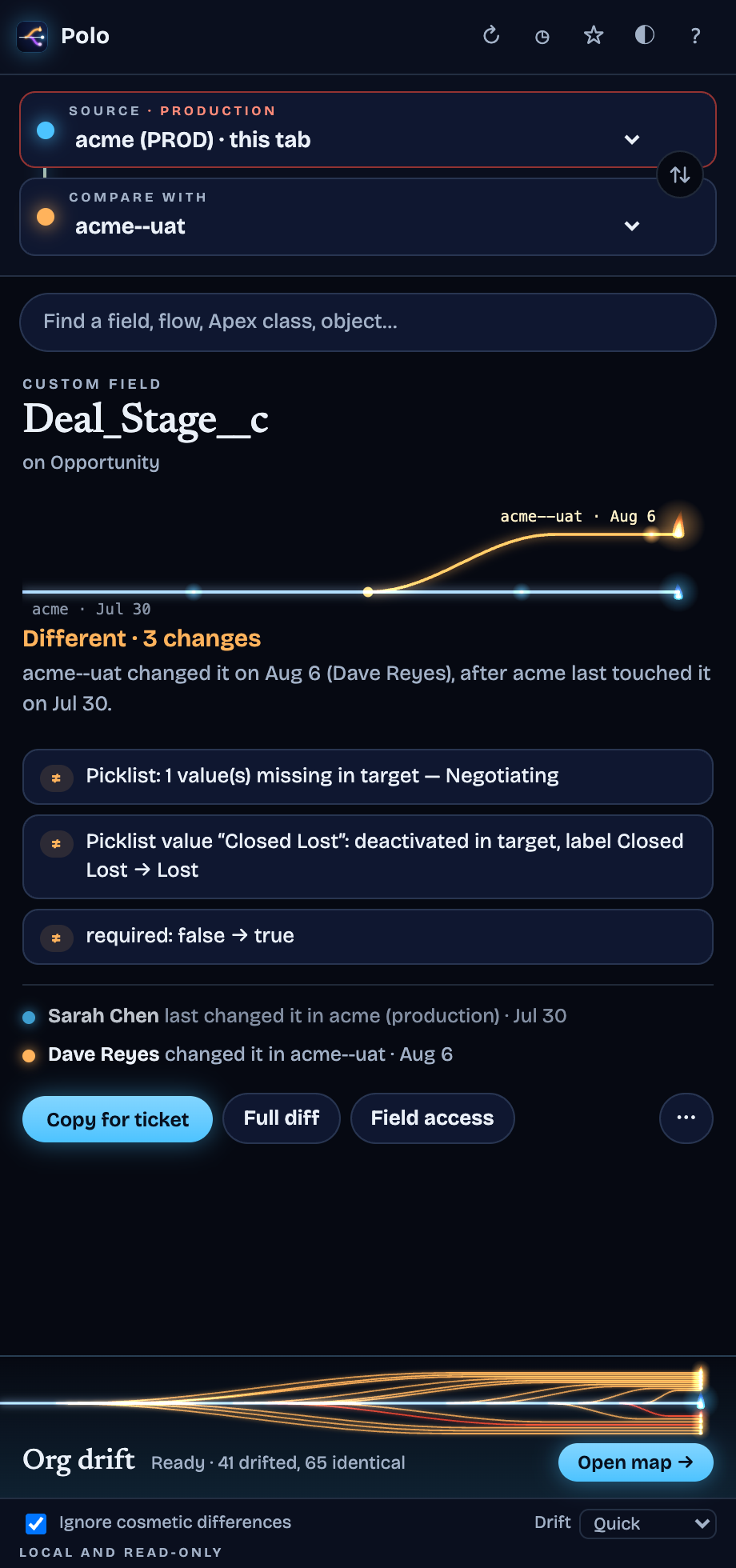
Polo side panel: Deal_Stage__c compared between production and UAT. A glowing branch shows UAT changed it, with 3 changes spelled out as sentences and who changed it in each org
One component, one answer: verdict first, changes as sentences, who touched it last.

Polo in 60 seconds.

Six short looks, each under half a minute. Tap one to play.

Is it the same in prod?

The Org drift map

Dive into any branch

Quick, Full or Everything

Recent changes to package.xml

Watchlist to release report

One component, one answer.

Open Polo next to Setup and it follows whatever you click. No copy-pasting API names, no second window, no two Setup tabs side by side and squinting.

VERDICT

The line answers first

A straight line means the two orgs match. A branch means one of them moved, and it shows you which one and when. Every change reads as a plain sentence: “required: false → true”, “picklist value missing in target: Negotiating”, with the full diff one click away.

WHO

Who touched it last, in each org

One line per org with the person and the date. Full history merges the Setup Audit Trail and flow versions into one timeline for both orgs, live from Salesforce.

DEEPER

Field access, permission sets, flow versions

Field access shows which profiles and permission sets can read or edit a field in each org: the “works in sandbox, broken in prod” answer a metadata diff can't give. Compare a permission set's access, scan a whole object, or diff two versions of a flow.

HAND-OFF

Something to attach to the ticket

Copy for ticket puts the facts on your clipboard for Jira, Slack or the PR: what differs, where, who changed it last. Report opens a print-ready page of the diff and history.

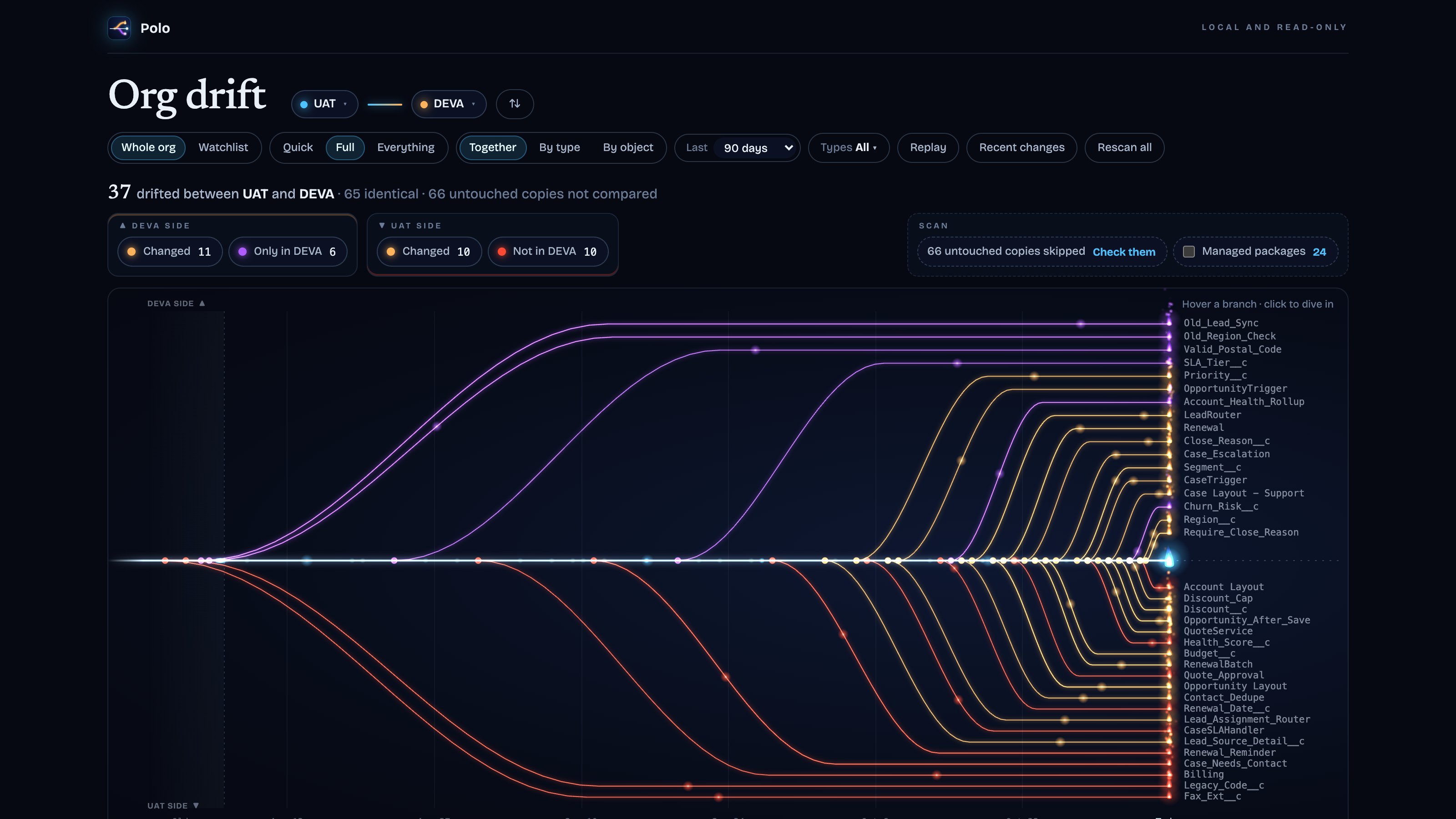
Org drift: every difference, on one line.

Pick two orgs and Polo lists both, compares everything they share, and draws the result. Everything that matches is one glowing line. Every component that drifted branches off on the day it changed and runs to today: above the line if the target org moved, below if the source did.

Polo's Org drift map between UAT and DEVA: one glowing line with a branch for each of 37 drifted components, labelled by name, with counts of changed, only-in and not-in components on each side
Sample data. Above the line, DEVA moved. Below, UAT did. Red never made it to the target.
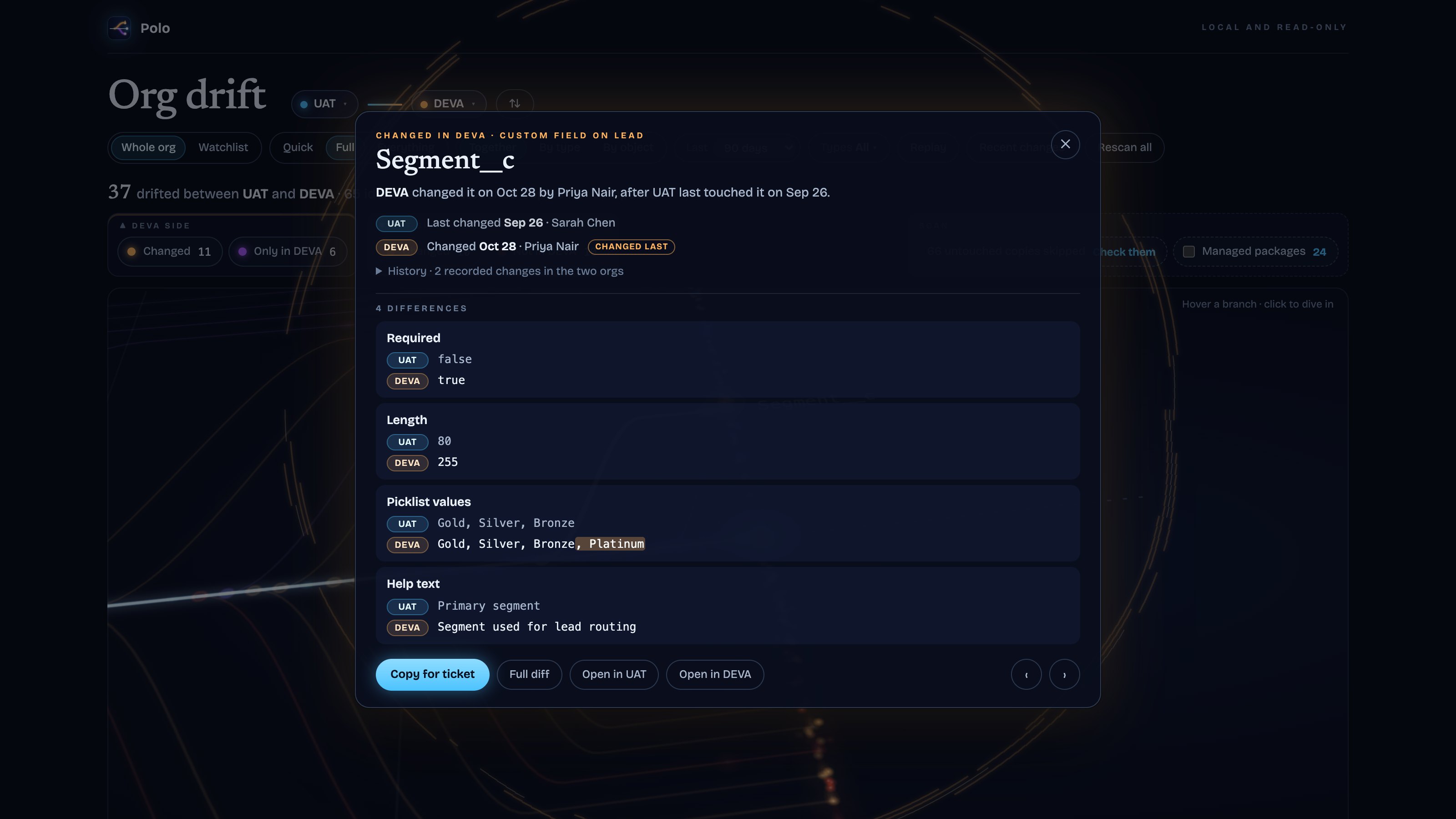
A drift card for Segment__c on Lead: changed in DEVA by Priya Nair after UAT last touched it, with four differences side by side: Required, Length, Picklist values and Help text
Click a branch and it opens: both orgs' values, side by side.
  • Dive into any branch. The card shows both orgs' values side by side, who changed it in each org, and its history. Arrow keys step through the rest.
  • Together, by type or by object. One line for everything, a line per metadata type, or a line per object: everything that drifted on Quote, Opportunity, your custom objects.
  • No noise you didn't ask for. Managed packages and untouched sandbox copies are skipped by default, one click brings them back.
  • Opens instantly the second time. Scans are saved in your browser. Reopen the map and Polo re-checks only what moved since. It even starts the scan in the background when you open the side panel.
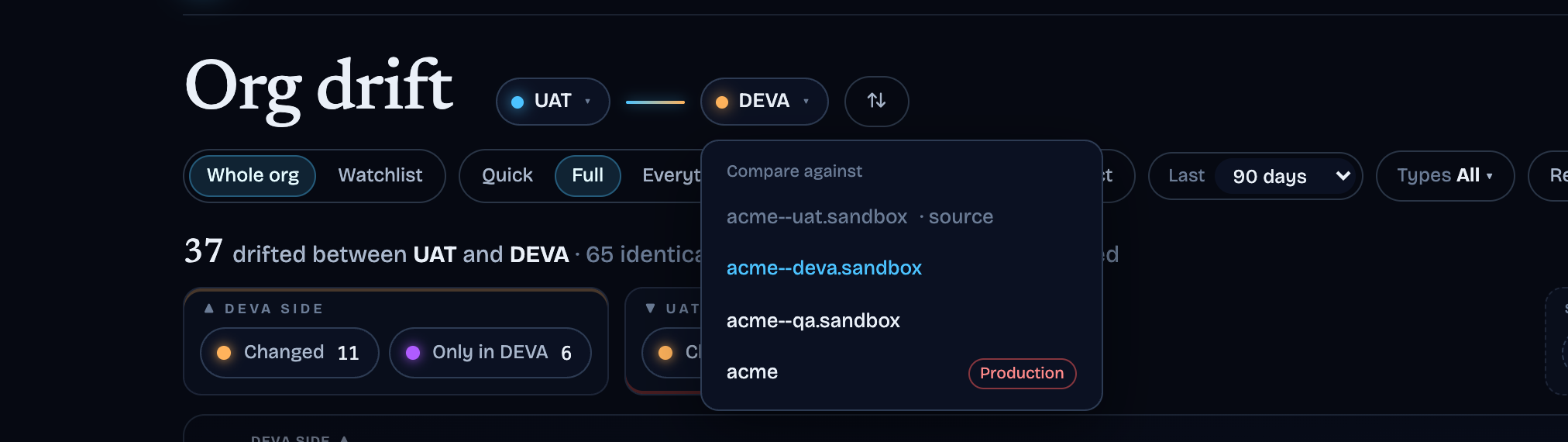
The org picker on the Org drift page: compare UAT against DEVA, QA or production, with production marked in red
Change either org right on the map. Production is marked, so you always know which one you're looking at.

Quick, Full or Everything. You pick the depth.

Real orgs have thousands of components. Speed matters, and so does knowing what you're looking at. One switch decides how hard Polo looks.

QUICK

Seconds, not minutes

A few bulk queries per type. Exact for Apex, Visualforce, Lightning components and custom labels. It compares content, never deploy dates, so a pipeline that re-deploys the same code doesn't light up the map. What Quick can't settle, it says so instead of guessing.

FULL

The whole story

Reads every changed component's full definition: fields, flows, layouts, rules, pages and the rest. Slower, and it's the one to run before a release.

EVERYTHING

About 50 more types

Full, plus what only the Metadata API can read: sharing rules, approval processes, org settings, translations, Agentforce. It needs “Modify Metadata” on your user, so it's opt-in.

Recent changes: who changed what, and did it make it?

Every component changed in an org since a date you pick, grouped by type or by person, and checked live against the next org in your pipeline.

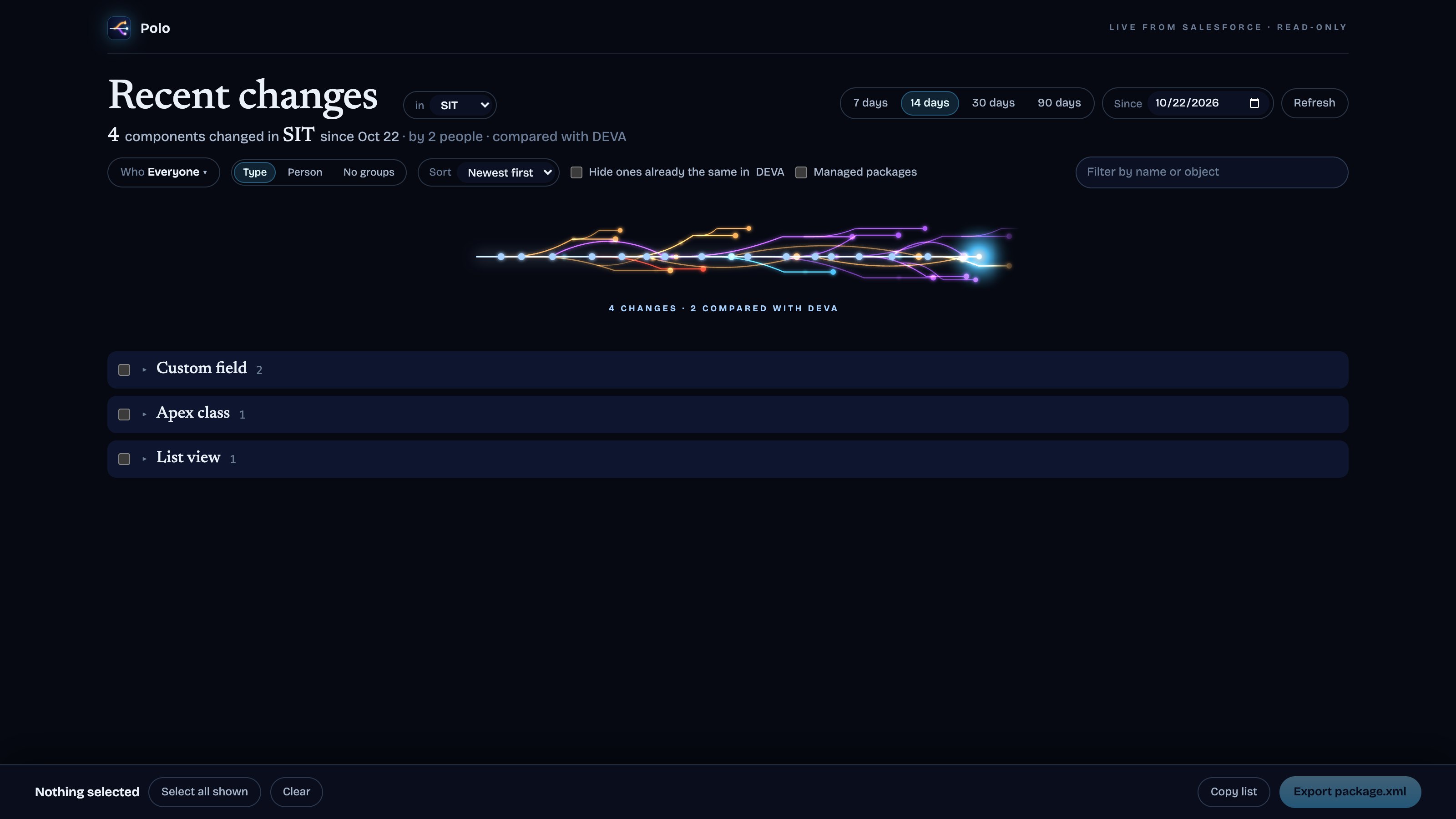
Polo's Recent changes page: 4 components changed in SIT since Oct 22 by 2 people, compared with DEVA, grouped by type, with an Export package.xml button
Sample data. Tick what's ready and export a package.xml for it.
PACKAGE.XML

A manifest, one click

Tick the changes that are ready and Polo writes a Metadata API manifest for exactly those components. Retrieve from source, deploy to target, with your normal tooling and your normal approvals.

WATCH

Pin what's in flight

Add anything to the watchlist and re-check it in one click. Turn on the daily re-check and Polo badges its toolbar icon when something drifts. The map can show just your watchlist, too.

FILES

Your watchlist is a file

Export ↓ saves it as polo-watchlist.json, Import ↑ restores it on another machine or hands it to a teammate. Release report ↗ turns it into a print-ready go/no-go table, action-needed rows first.

Custom & standard fieldsValidation rulesFlows Apex classes & triggersPage layoutsLightning pages Record typesQuick actionsButtons & linksVisualforceLWC & Aura Email templatesCustom labelsPermission setsTabs, apps, list views Workflow & approvalsSharing rulesCustom metadataStatic resources Org settingsOmniStudioAgentforce…and more

No OAuth, no connected apps, no new passkeys. Any two orgs.

Polo rides on the Salesforce sessions you already have in your browser. That turns out to matter more than it sounds.

SIGN IN LIKE ALWAYS

Nothing to install in the org

No connected app, no OAuth dance, no package, no API user to provision. Log into Salesforce in your browser the way you already do and every org you're signed into shows up in Polo's org picker.

UNRELATED ORGS

They don't have to be a sandbox and its prod

Polo matches components by API name, never by ID, so the two orgs don't need to be related at all. Two customers on different stacks, an old org and the one replacing it, a client's prod against your reference org: if you can log into both, you can compare them.

READ-ONLY, LOCAL

Look, don't touch

Polo only ever reads. Metadata goes from your orgs straight to your browser and stays there: no servers, no accounts, no telemetry.

Read-only isn't a setting. It's the product.

Polo never writes to an org, and your metadata never leaves your browser.
  • No deploys, ever. Polo writes a package.xml, you run the retrieve or deploy. Its network layer is hard-wired to read. The one exception is the Metadata API's list and read calls, which Salesforce only offers as POST requests; Polo can't send any other kind.
  • No servers, no accounts. The only calls are from your browser to your own orgs' APIs, using the sessions you already have.
  • No secrets in your clipboard. Connected app keys and secrets are dropped before anything is saved, compared or copied.
  • No telemetry. We don't know when you install it, open it, or what orgs you point it at.
  • Nothing installed in your org. No connected app, no OAuth, no package.

Read the full privacy policy →

Free to compare. PRO when you want the whole org.

The side panel is free, for good. PRO adds the org-wide view: one key, one payment, no subscription.

Free

$0
forever
  • Compare any component between two orgs
  • Changes in plain sentences, full diff
  • Who changed it, in each org
  • Field access, permission sets, flow versions
  • Copy for ticket
Add to Chrome Add to Edge Add to Firefox Add to Safari

PRO

$49
one-time, yours for good
  • Everything in Free
  • The Org drift map, Quick, Full or Everything
  • Recent changes with package.xml export
  • Watchlist, daily re-check, release report
  • 7-day free trial, no card and no email: start it from the PRO chip in Polo's panel
Buy PRO — $49

The Explorers Kit

$79
one-time · Marco, Polo, and Magellan
  • One key unlocks PRO in all three
  • Marco: where used and impact
  • Polo: org compare and drift
  • Magellan: best-practice findings
  • $107 bought separately
Buy the kit — $79

Questions or ideas?

How many orgs you compare, what your release process looks like, what you'd want Polo to do next: a short email is enough.

chris@creedysolutions.com